Accessing the CLI
You can access the device's CLI using the following methods:
|
■
|
RS-232: Device's that are appliances (hardware) can be accessed through RS-232 by connecting a VT100 terminal to the device's console (serial) port or using a terminal emulation program (e.g., HyperTerminal®) with a PC. Once you have connected via a VT100 terminal and started the emulation program, set the program settings as follows: |
For cabling your device's RS-232 interface (console port), refer to the device's User's Manual or Hardware Installation Manual.
|
■
|
SSH: For remote access, the device can be accessed through the SSH protocol using third-party SSH client software. A popular freeware SSH client software is PuTTY. By default, SSH access is disabled. To enable SSH, enter the following command set: |
# configure system
 (config-system)# cli-settings
 (cli-settings)# ssh on
|
■
|
Telnet: For remote access, the device can be accessed through the Telnet protocol using third-party Telnet client software (e.g., PuTTY). Most Windows® computers come with a program called Telnet, which can be activated via the Windows command line: |
> telnet <Device's OAMP IP Address>
Welcome to ...
Username: <Username>
Password: <Password>
|
●
|
When accessing the device's CLI, you are prompted to enter your management username and password. The credentials are common to all the device's management interfaces (e.g., Web). |
|
●
|
If your 'Status' in the Local Users table is New, after entering your username and current password, you're prompted to change your password: |
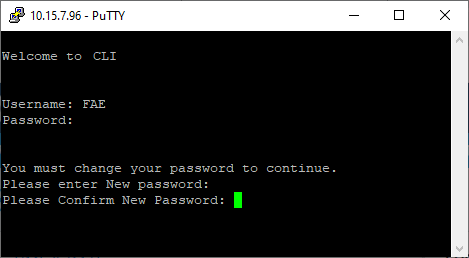
After entering a new password in the 'New password' and 'Confirm New Password' fields, you're CLI session automatically closes and you need to log in again with your new password.
|
●
|
The default username and password of the Administrator user level is Admin and Admin, respectively. |
|
●
|
The default username and password of the Monitor user level is User and User, respectively. |
|
●
|
You can enforce password complexity, using the enforce-password-complexity command. For a description of password complexity, refer to the User's Manual (WebUsers_Password). |